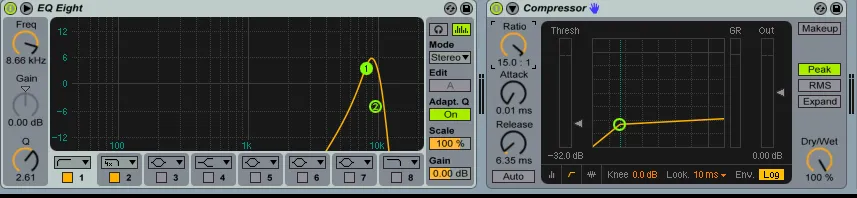
A de-esser reduces sibilance—harsh “sss” and “shh” sounds in words like “ship,” “chip,” or “sip”—preventing them from standing out and jarring listeners. The tool combines equalization and compression functionality into a specialized processor.
In This Guide
How De-Essers Work
De-essers function as multiband compressors, targeting the 3-10 kHz frequency range where sibilance typically occurs. When the processor detects excessive energy in these frequencies, it reduces the volume of those specific sounds.
Key Parameters
| Parameter | Function |
|---|---|
| Threshold | The point triggering compression |
| Ratio/Range | Controls compression intensity |
| Frequency | Target range for sibilance detection |
- Ratio shows dB of input needed per 1 dB of output change
- Range sets maximum gain reduction that can be applied
Split-Band vs. Wide-Band Modes
Split-Band Mode
Isolates and compresses only targeted frequencies while preserving others.
Best for:
- Professional microphones with good overall tone
- Situations where you want to preserve vocal presence
- Music production applications
Wide-Band Mode
Compresses the entire signal when sibilance is detected.
Best for:
- Budget microphones where harshness spreads across wider frequency ranges
- Severely sibilant recordings
- When split-band processing creates unnatural results
Configuration Tips
Threshold Settings
Set thresholds very low (-40 to -20 dB) to catch sibilance early. Unlike regular compressors, de-essers benefit from catching these sounds before they become problematic.
Ratio Settings
Use high ratios (8:1 to 15:1+) for effective sibilance control. De-essing requires more aggressive settings than typical compression.
The Golden Rule
Trust your ears for optimal results. Every voice is different, and what works for one speaker may not work for another.
Advanced Techniques
Stacking De-Essers
If a single de-esser isn’t sufficient:
- Apply split-band de-esser first (targets specific frequencies)
- Follow with gentler wide-band de-esser (catches what slips through)
This approach provides thorough sibilance control without over-processing.
Signal Chain Position
Position de-essers after compressors in your signal chain:
- Noise reduction
- Compression
- De-essing ← Here
- EQ (see podcast EQ settings)
- Limiting
Compressors can emphasize sibilance, so de-essing afterward catches any newly problematic sounds.
Recommended Tools
Free Option
Airwindows DeBess — Effective and completely free, with simple controls that work well for podcast applications.
Premium Option
Hornet Sybilla — More features and visual feedback for those who want precise control.
Common Mistakes
- Over-processing — Removing too much creates lisping sounds
- Wrong frequency targeting — Not all sibilance lives at the same frequency
- Processing before compression — Compressors can bring out sibilance
- Ignoring the source — A pop filter and proper mic technique prevent many issues
Key Takeaways
- De-essers are specialized multiband compressors targeting 3-10 kHz
- Split-band mode preserves tone; wide-band mode is more aggressive
- Use low thresholds and high ratios
- Stack de-essers for stubborn sibilance
- Always position after compression in your signal chain
Want professional audio processing without the technical complexity? If mixing and mastering isn’t where you want to spend your time, Podigy handles the entire post-production process.